Gemini Omni Pro: The Early Warning Most Teams Are Reading Backwards
Gemini Omni Pro still has no date, price or model ID. The release note that actually changes your video budget landed on November 5, 2026 — and it carries a December 3 deadline.
On November 5, 2026, a short clip labeled "Gemini Omni Pro" started circulating on X, and the question that follows every such clip went around the usual channels: it does 4K, it does 15 seconds, should we wait for it?
That question was being asked on the same day Google made Gemini Omni 1.2 Flash generally available — and against the same release notes that quietly scheduled a change nobody forwarded: from December 3, 2026, every API request to gemini-omni-1.1-flash, the previous release of Google's any-input video model, routes to gemini-omni-1.2-flash, at 1.2 rates.
One of those signals is a screenshot of a model you cannot call. The other is a dated change to a model you may already be paying for by the second. This article separates them, works out what a Pro tier would actually have to fix, and sets out what is worth doing this month rather than in February.
The short answer
- Gemini Omni Pro is not released, and Google has not announced it. As of November 8, 2026, the Gemini API's model list and pricing page contain two Omni models:
gemini-omni-1.2-flashandgemini-omni-1.1-flash. There is no Pro model ID, no price, no model card, no spec sheet and no date. - The only public "Pro" evidence is one X post from November 5, amplified by a repost. It says "4K supported" and "15 second." Gemini Omni 1.2 Flash already ships both, so the leak does not establish what a Pro tier adds.
- What is confirmed: 1.2 Flash went GA on November 5 with native 15-second clips, up to six reference images, $12 per million video output tokens (roughly $0.07 per second at 720p), and doubled paid-tier rate limits.
- Where the family actually stands: on the Artificial Analysis text-to-video board, Omni Flash 1.1 is 12th at Elo 1127 while Wan 3.0 leads at 1172; on the video-editing board the same model is 4th at 1146. Omni's advantage is conversational editing and reference consistency, not raw text-to-video taste — which tells you exactly what a Pro tier would have to change.
- What to do now: pin your model string, record resolution and seconds on every render, keep a fixed regression prompt set, and do not pause production for an unannounced model.
What Google has actually confirmed
The Omni family has a public paper trail, and reading it in order is more useful than reading launch-day threads. Every date below comes from Google's own documentation.
| Date | What shipped | Why it matters to your workflow |
|---|---|---|
| May 19, 2026 | Gemini Omni announced at I/O and rolled out in the Gemini app, Flow and YouTube Shorts. Google called Omni Flash "the first model in the Omni family." | A family with a first model implies a second. It never implied a date. |
| June 30, 2026 | gemini-omni-flash-preview opens on the API: 3 to 10 second clips at 720p. |
Developers get a surface to build against before general availability. |
| August 27, 2026 | Omni 1.1 Flash goes GA with resolution control (360p, 720p, 1080p, 4K), video extension, and first/last-frame interpolation. | The resolution ladder you have today is partly an upscale, not native generation. |
| November 5, 2026 | Omni 1.2 Flash goes GA: native 15-second clips, six reference images, 30% lower pricing, doubled rate limits. | The most consequential video price cut of the year. |
| December 3, 2026 | 1.1 Flash requests automatically route to 1.2 at 1.2 rates. | A dated change to whatever your pipeline calls today. |
That last row is the part of the release note worth pasting into your project tracker, and it is the clearest early warning in this whole story — not because a better model is coming, but because your cost per second and your output behavior both change on a date Google has already printed.
Here is the entry itself, captured from the Gemini API release notes on November 8, 2026:
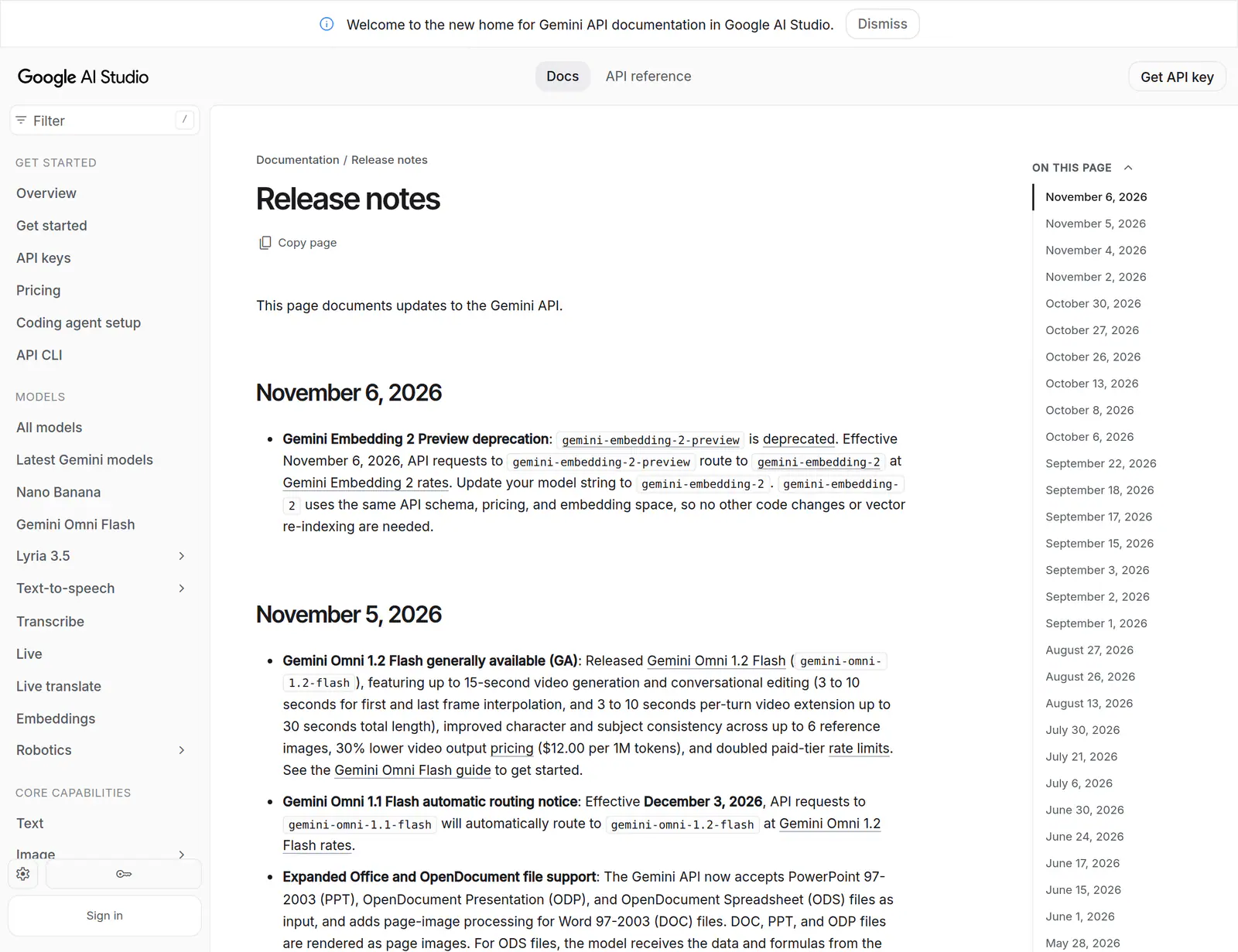
If you only read one line of that image, read the second bullet: the older model string does not break on December 3 — it silently resolves to the newer model. Silent resolution is convenient for prototypes and dangerous for anything with a brand look to defend.
What Omni actually does
For anyone arriving cold: Gemini Omni is Google's any-input video model, and its model overview is the fastest primer. Text, images, audio and video all go in as references, video with audio comes out, and you refine the result by talking to it turn by turn instead of re-prompting from scratch.
Google's launch demo is still the quickest way to see that in practice. Watch the four-turn sequence where a violinist is moved into a new environment, has the instrument removed, and then gets a new camera angle, with the scene holding together across every instruction:
Watch the Gemini Omni launch demo on YouTube
It is a curated launch reel, so watch it for the workflow rather than as a quality verdict. The quality question is what the leaderboards below are for.
Why the November 5 leak is weaker evidence than it looks
The post is thin, and it is worth being explicit about how thin, because most "Omni Pro release date" pages currently being published treat it as a specification.
It is a single account on a single day, saying the model was "spotted internally" with "4K supported" and "15 second," plus a clip with no explanation of how it was obtained. A second account reposted it, which reads like corroboration but isn't — same claim, same origin. Google has not commented.
Then there is the content problem. Both of the leak's headline numbers were already shipping in Flash:
- 15 seconds became the native limit with 1.2 Flash on November 5.
- 4K has been an output option since August 27 — but per Google's own documentation, "1080p and 4K outputs are generated using upscaling."
That second point is the interesting one. Google's pricing page prices 4K per second "with upsampling," which means the current model's 4K is a cheap finish rather than native high-resolution generation. A Pro tier that generated natively at 4K would be a real step change. A Pro tier that upscaled the same way would not be worth a migration. The leak cannot tell you which one it saw, and neither can anyone else publishing today.
So treat "Gemini Omni Pro" as a label for an expectation rather than a product. The name does not appear in Google's I/O announcement, in the API model list, in the changelog, or in any published model card. What does appear is the phrase "the first model in the Omni family," and a promise that Google will "in time" support output modalities like image and audio. That is the entire official foundation for a Pro tier.
What a Pro tier would have to fix
The rest of this section is forecast, not documentation. But it is forecast built on published gaps rather than vibes, and each gap is checkable.
1. Native resolution, not upscaled resolution. Today's top output is an upscale. A Pro model that renders 4K natively, with the detail budget that implies for packaging type, fabric weave and product edges, would justify a new tier for retail and catalog work. One that re-upscales 720p would be a marketing tier.
2. The text-to-video preference gap. On Artificial Analysis's blind-vote text-to-video leaderboard, Gemini Omni Flash 1.1 sits 12th at Elo 1127 with roughly 7,800 votes. Wan 3.0 leads at 1172 — a 45-point gap — with MiniMax H3, FLUX 3 Max, Seedance 2.5 and HeyGen Video 1 all above Omni.
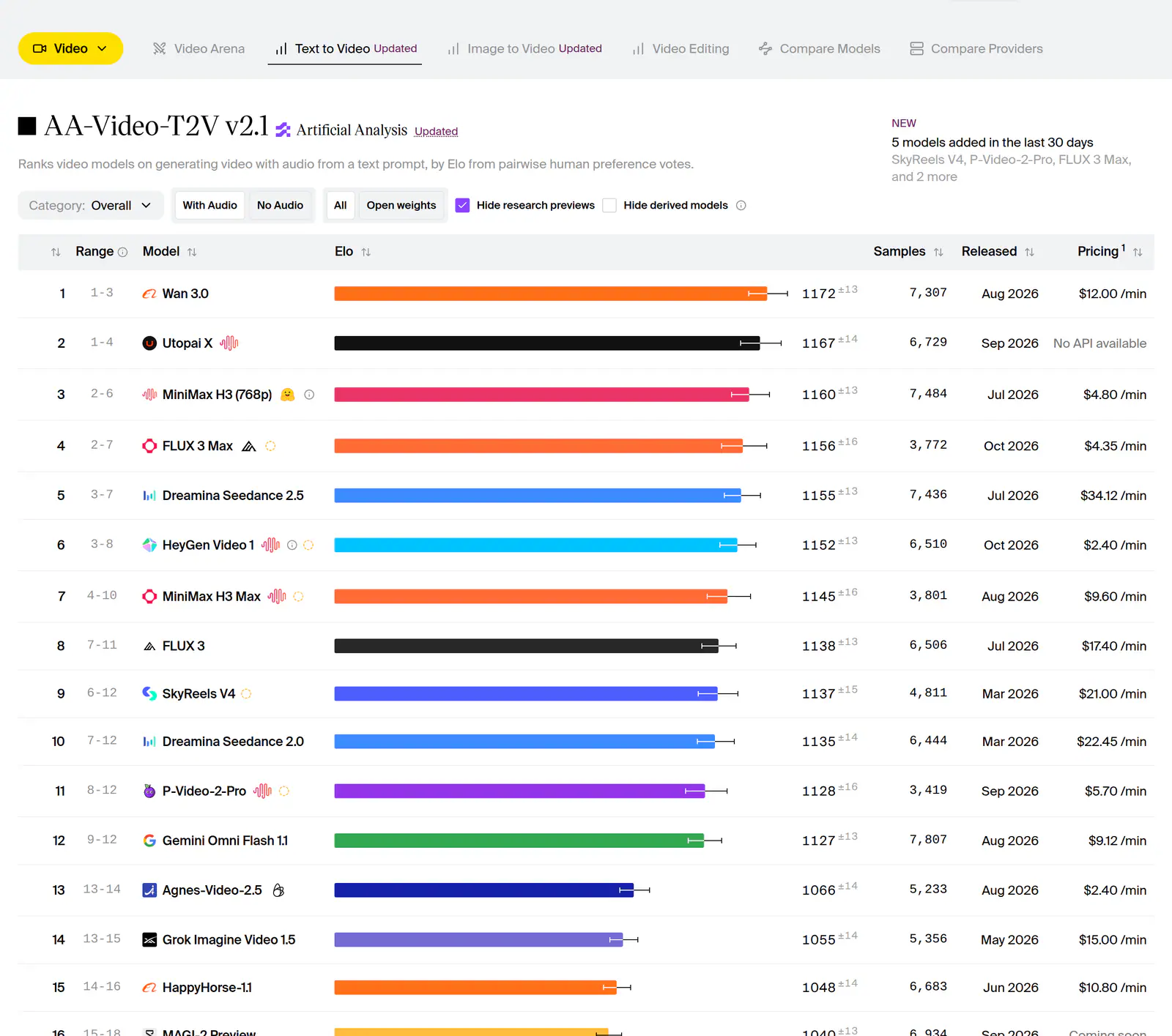
Read the price column on that board and the picture sharpens: MiniMax H3 sits third at $4.80 per minute by the board's 1080p pricing column, while Omni Flash 1.1 is at $9.12. Google is not winning the "best-looking clip per prompt" contest, and it is not the cheapest either. It is winning somewhere else — which is where the editing board comes in.
3. Motion under stress. Google's own 1.2 announcement names what is still unfinished: "development is ongoing to further improve things like fast sports action, rapid script changes and complex physics." The model card for Omni Flash is blunter: "maintaining complete consistency throughout edits, generating scenes with complex motion, or rendering perfectly accurate text remains a challenge." Sports, dance, fight choreography and anything with a fast camera whip are where a Pro tier earns its name or doesn't.
4. Duration. Fifteen seconds native is a real improvement over ten. It is still not a 30-second spot. Extension adds 3 to 10 seconds per turn up to 30 seconds total, but every extension is another generation with its own continuity risk — and continuity at the seams is precisely what the model card flags. A Pro tier that produced 30 to 60 seconds in one pass, with audio, would change how agencies storyboard.
5. Outputs beyond video, and speech editing. Google has said image and audio outputs are coming to the Omni family "in time." Separately, both model cards note that the model can change people's speech and that the capability is currently restricted while Google works out how to ship it responsibly. Either could land in a Pro tier. Neither has a date.
Worth pausing on the editing board, because it reframes the whole comparison. On Artificial Analysis's video-editing leaderboard, Omni Flash 1.1 ranks 4th at Elo 1146, ahead of MiniMax H3 and behind Wan 3.0, Hyperflow H3 and Seedance 2.5 — with a sample count comparable to the text-to-video board.
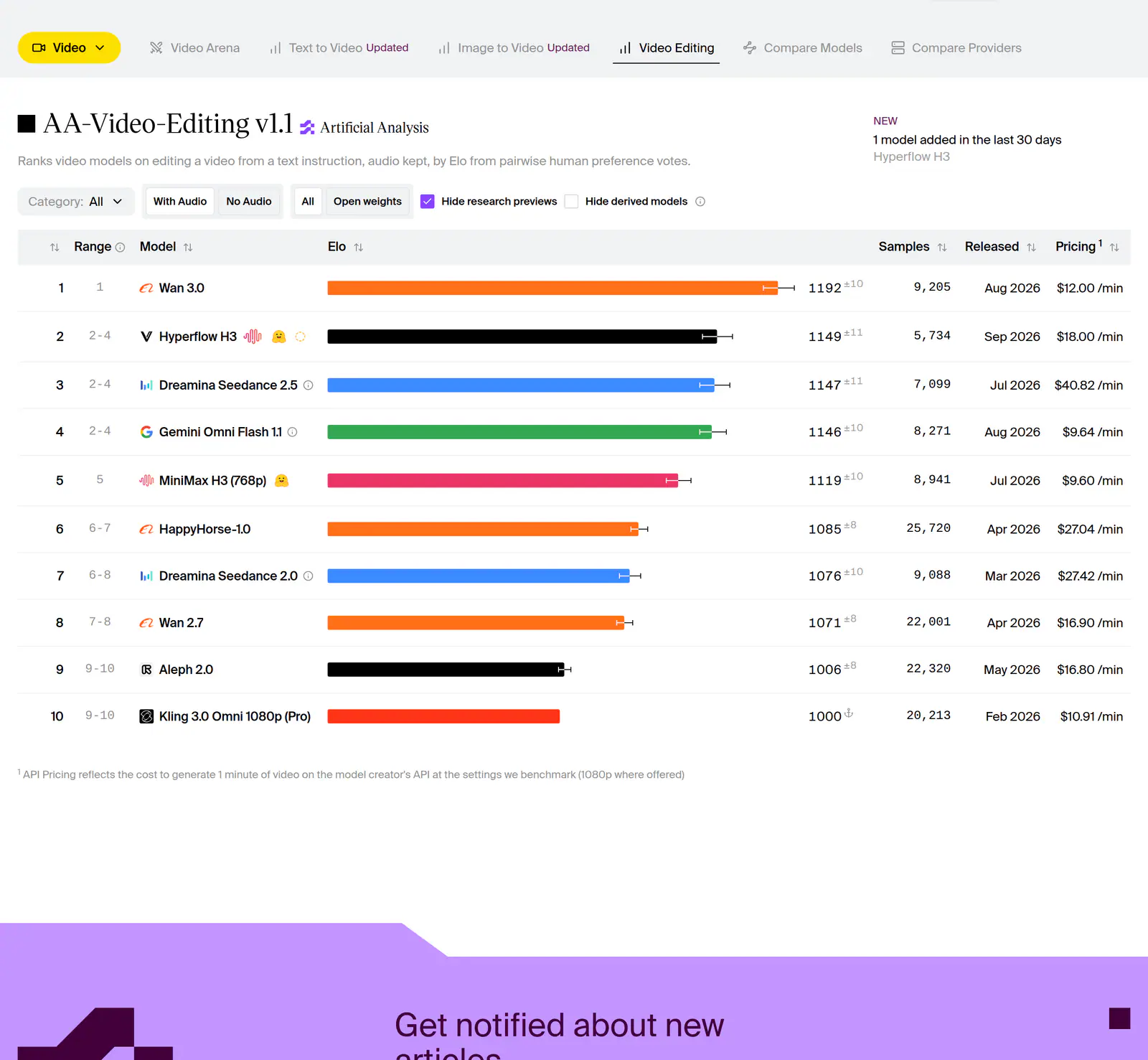
Two boards, one model, two different positions. Omni is a mid-table text-to-video generator and a top-five video editor. That is not a contradiction; it is the product thesis. Google built Omni to hold a scene together across conversational turns, and the editing board is where that shows up. It also means a Pro tier does not have to beat Wan on first-prompt aesthetics to be worth buying — but it does have to be better than 12th if Google wants the "best model" headline rather than the "best editing workflow" one.
The warning that already has a date
Set the leak aside for a moment and deal with December 3.
Right now, if your code says gemini-omni-1.1-flash, you are on 10-second clips, 1.1 consistency behavior, and 1.1 pricing. After December 3, the same string returns 1.2 output at 1.2 rates. Nothing throws an error. Nothing pages you. Your clips look slightly different and your invoice changes shape.
Three practical consequences, in order of how often they bite:
Your cost model moves, in your favor, unevenly. 1.2 is about 30% cheaper per second at 720p than 1.1. If your finance forecast was built on the old number, your variance report will explain itself. The subtlety is resolution: 1080p is billed at $0.104 per second and 4K at $0.209, so a team that quietly moved its finish step from 720p to 1080p in the same quarter can see spend rise while the sticker price fell.
Your approved look may not survive the swap. 1.2 changes consistency behavior, reference adherence and speech naturalness. A prompt that produced a specific product spin in October can produce a different one in December — same words, different model. If you have a brand film in flight, regenerate your approved frames on 1.2 before December 3 rather than after a client review.
Your rate limits changed and you may not have noticed. Paid-tier limits doubled with 1.2. If your queue throttles at a number you set in September, you are leaving throughput unused.
The fix is unglamorous: log the model ID next to every render, keep ten approved clips from the current model in a folder you can compare against, and re-run them the week of the switch.
What it costs today, and what a Pro tier has to beat
Google bills Omni 1.2 Flash on video output tokens, and the pricing page converts them to seconds for you. The whole ladder, so you can budget without opening a spreadsheet:
| Output | Tokens per second | Price per second | 15-second clip | One minute |
|---|---|---|---|---|
| 360p | 1,931 | $0.023 | $0.35 | $1.38 |
| 720p | 5,792 | $0.070 | $1.05 | $4.20 |
| 1080p (upsampled) | 8,688 | $0.104 | $1.56 | $6.24 |
| 4K (upsampled) | 17,376 | $0.209 | $3.14 | $12.54 |
Those are generation costs, not production costs. Nobody ships the first render. If a shot takes four attempts at 15 seconds, one finished 720p clip costs about $4.20 in model time, and one finished 4K clip about $12.56. Multiply by the number of cuts in a 30-second ad and the reason Google pushed a draft-first workflow becomes obvious: draft at 360p, fix details with a follow-up edit instead of a full regeneration, then finish once.
Which gives you the only number worth negotiating with when a Pro tier arrives: cost per approved second, not price per generated second. A Pro model at twice the per-second rate that lands the shot in half the attempts is cheaper than Flash. A Pro model at twice the rate that still needs four takes is a 100% budget increase for the same output.
Write the threshold down before launch, while you are unemotional about it. Something like: "We will pay up to 3× today's 1080p rate for native 4K that cuts our retry count in half; above that, the hero shot goes to a specialist model." When the keynote lands, you will be deciding against a number instead of a demo reel.
Preparing without betting on a rumor
None of this requires knowing what Pro does. All of it makes the swap cheap when it happens.
Instrument the basics. Every generation should record model ID, resolution, requested seconds, attempt number and approved/rejected. Without that, "the new model is cheaper" is an opinion. With it, it is a line in a table.
Build a 20-prompt regression set. Cover the failure modes Google itself lists: one product 360-degree spin with packaging text; one six-reference character consistency shot; one fast sport; one multi-speaker dialogue scene; on-screen text in two scripts; a 15-second single take with a camera move; a first/last-frame interpolation; a three-second motion transfer. Re-run it the week any Omni model ships, and score it blind against the previous version.
Organize reference assets now. Six images maximum for consistency, motion clips up to three seconds, and — if you plan to use voice or audio references — note that audio references are gated behind allowlisting on Google Cloud, so do not build a launch plan around access you have not been granted.
Separate the look decision from the resolution decision. Approve framing, motion and lighting at 360p or 720p. Treat the finish as a technical step that can be swapped from upscale to native later without re-briefing the creative team.
Keep a second model in the pipeline. Veo still sits alongside Omni in Google's model catalog, and it remains the more sensible call for shots that need longer clips or a different look. A pipeline that can only call one vendor is a pipeline that pays whatever that vendor asks.
Watch for the boring signals. In order of reliability: the API changelog (every GA change is logged there, including routing notices), the model list and pricing page (a Pro tier appears as a new line item with a per-second price), DeepMind's model card index (every Gemini media model gets a card — 1.2 Flash's was published in November 2026), then Artificial Analysis (a new Omni entry with sample counts usually appears within days of an API release), then product surfaces like the Gemini app and Flow.
And ignore the loud ones. Internal-sighting threads, thumbnails with "4K" in the corner, and aggregator pages whose release dates move every week. If you want an arithmetic anchor instead of a rumor: Omni's public cadence so far runs preview (June 30) to 1.1 GA (August 27) to 1.2 GA (November 5) — eight to ten weeks between releases. If that rhythm holds, the next Omni release lands around late January 2027. That is pattern-matching, not a promise, and it is worth exactly as much as your tolerance for planning on patterns.
Should you wait?
If you are a solo creator on a Google AI subscription: no. A Pro tier will appear in the same app, and everything you learn about conversational editing on Flash — how a turn inherits the previous scene, how much weight a reference image carries, how far you can push a camera move — transfers to the next model. Waiting buys you nothing except a later start.
If you are an in-house marketing team with a locked Q1 calendar: no, but shorten your commitments. Produce on 1.2 Flash, hold the one hero 4K shot as an explicit decision point in February, and put the December 3 routing change in the same risk register as your media plan.
If you are building a product on the API: prepare now; it is cheaper than waiting. The interface does not change when a new Omni model ships — a new model string, a new price, and a re-run of your regression set. Teams that do this in an afternoon get a week of evaluation before their competitors finish the pilot.
FAQ
Is Gemini Omni Pro out?
No. As of November 8, 2026, Google has published no model ID, price, spec sheet or release date for a Pro tier, and the API lists only gemini-omni-1.2-flash and gemini-omni-1.1-flash.
When will Gemini Omni Pro be released? Nobody outside Google knows, and Google has not confirmed that the product will carry that name. The only public claim is a single X post from November 5, 2026.
Is Omni Pro better than Omni 1.2 Flash? Unknown. The leak's two data points — 4K and 15 seconds — are already available on 1.2 Flash, so they say nothing about what a Pro tier adds.
Can I generate 4K with Gemini Omni today? You can output 4K, but it is upsampled rather than natively generated, which is why it costs $0.209 per second instead of $0.07 at 720p. Whether a Pro model renders 4K natively is the most useful question to ask at launch.
Does Omni Pro replace Veo? There is no indication of that. Omni is the any-input, conversational-editing line; Veo remains a separate family in Google's catalog for work that needs longer clips or a different look.
What happens to my 1.1 prompts on December 3, 2026? They keep working, but they resolve to 1.2 at 1.2 rates. Regenerate anything approved before that date if the exact look matters, and update your cost forecast to the new resolution ladder.
Is Omni good enough to replace a production pipeline today? For editing passes, product variants and social cutdowns inside 15 seconds, it is competitive — the editing leaderboard puts it fourth. For fast sports action, long-form storytelling and complex physics, Google's own documentation says the work is ongoing.
What the screenshot is really telling you
The forwarded clip will get a real answer eventually, probably with a keynote, a model card and a price per second attached. When it does, the useful response will not be "we told you it was coming." It will be a table showing what the new model does to your cost per approved clip, and a pipeline where switching is a one-line change plus an afternoon of re-running prompts you already wrote.
The December 3 routing notice is a smaller event than a launch and a much better teacher: it shows how Google moves models underneath you. Pin the model string. Log the seconds. Keep the ten clips you approved. Then a launch is just a Tuesday you were ready for.