
Pika H3 Flex: Pricing, Reference-to-Video, and What Its 4K Output Really Means
Explore Pika H3 Flex pricing, reference video costs, upscaled 4K output, audio, hardware needs, and license restrictions.

A 10-second dance clip can cost more than its advertised per-second rate suggests. If the model uses a video to copy the movement, you may be paying for the reference footage as well as the finished clip. That distinction matters when you are generating multiple takes.
Pika H3 Flex is worth a closer look because it combines reference-guided video, synchronized audio, and relatively low launch pricing. But its most useful details are also the easiest to miss: 4K is upscaled rather than native, video references add to the bill, and the downloadable weights come with a restrictive community license.
Released on October 29, 2026, H3 Flex is Pika’s post-trained version of MiniMax H3, not a new base architecture. The model can generate clips from text, images, or multiple references, and it is available through Pika’s hosted API and as downloadable adapters for local workflows. Pika’s technical announcement describes the six-step generation process and the company’s own benchmark results.
Pricing and offer details below reflect the information published as of November 1, 2026. Check the current terms before budgeting a project.
What is Pika H3 Flex?
H3 Flex is designed for the part of AI video production that comes after the first prompt: trying a different character, adjusting a camera move, or keeping a performance while changing its setting.
It supports text-to-video, image-to-video, first-and-last-frame generation, and reference-to-video. A requested clip can be 5 to 15 seconds long, with synchronized stereo audio. The actual output length can be rounded to the model’s frame grid. The base model generates at 480p or 768p; Pika’s hosted service can then upscale the result to 1080p, 2K, or 4K.
The downloadable release consists of two task adapters built on MiniMax H3: one for text and endpoint-frame generation, and one for multimodal references. ComfyUI’s workflow guide explains how those adapters fit into an existing H3 workflow.
The distinction matters. Downloading an adapter does not turn H3 Flex into a small, standalone model, and the downloadable package does not include every feature offered by Pika’s hosted service.
How do the references work?
Reference-to-video lets you give different assets different jobs. One image might define a character, another might define the setting, and a video might supply the movement. An audio clip can provide an additional sound or voice reference.
There is a ceiling of 12 reference files in total, with these type-specific limits:
- Up to nine images.
- Up to three videos.
- Up to three standalone audio clips.
Those maximums cannot all be used simultaneously because the combined total must still be 12 or fewer. Each reference video or standalone audio clip must be 2–15 seconds, and the combined duration for each of those two media types cannot exceed 15 seconds. Reference mode also requires at least one image or video; an audio-only reference request is not supported. These limits are described in the model card.
Example: transfer a dance to a new character
Suppose you have a character illustration, a picture of a record shop, and an eight-second video of a dancer. You could assign the first image to identity and costume, the second to the environment, and the video to motion. A starting prompt might read:
Use Image 1 for the character’s appearance and outfit. Use Image 2 for the setting and visual style. Use Video 1 only for the dancer’s movement and timing. Show one character performing the movement in the record shop. Keep the character’s face and clothing consistent. Use a steady wide shot and include footsteps and room ambience.
That is a starting prompt, not a guarantee of an exact motion transfer. Check whether the hands, footwork, timing, and camera behavior follow the reference. Also check that unwanted details from the source video have not leaked into the new scene. If the result misses the brief, change one thing at a time: simplify the camera instruction, shorten the motion reference, or clarify what must stay consistent.
The following launch demonstration shows the kind of mixed-reference work Pika is presenting. It is a curated showcase, not an independent benchmark.
Pika H3 Flex API pricing
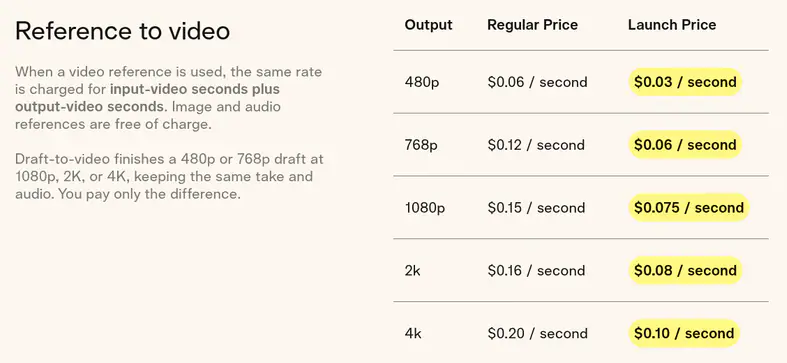
Pika lists separate launch prices for text, image, and keyframe generation versus reference-to-video. The following figures are in US dollars per second, as shown on the Pika H3 Flex pricing page:
- 480p: $0.01 for text/image/keyframe; $0.03 for reference-to-video.
- 768p: $0.02 for text/image/keyframe; $0.06 for reference-to-video.
- 1080p: $0.035 for text/image/keyframe; $0.075 for reference-to-video.
- 2K: $0.04 for text/image/keyframe; $0.08 for reference-to-video.
- 4K: $0.08 for text/image/keyframe; $0.10 for reference-to-video.
For text, image, and keyframe requests, the listed rate applies to output-video seconds. For reference-to-video, the output is charged at the reference rate, and any input-video seconds are charged at the same rate as well. Pika says image and audio references do not add a separate input charge.
Example cost: a dance reference
At the listed 768p launch rate, a nominal 10-second output using an eight-second reference video would be estimated as:
(10 seconds output + 8 seconds reference) × $0.06 = $1.08.
Five attempts with the same durations would come to an estimated $5.40. Without a video reference, a 10-second reference-to-video output at that rate would be $0.60, assuming no other chargeable video input.
These examples use nominal durations and published launch rates. They do not account for free promotional generations, membership, taxes, optional services, or any account-specific charges. Confirm the actual charge and any duration rounding in the API billing response before relying on the estimate.
The product page also lists regular 768p rates of $0.04 per second for text/image/keyframe generation and $0.12 per second for reference-to-video. At the latter rate, the same 10-second output plus eight-second video reference would be an estimated $2.16. Launch pricing can change, so it should not be the only number in a long-term cost model.
Free generations and membership
Pika advertised 15 free H3 Flex generations per day for Pika API Club members from October 29 to November 5, 2026. The public offer did not clearly specify the cutoff time, time zone, or which combinations of duration, resolution, and features qualify.
The API Club membership page lists a $10 monthly membership, with API credits described separately. Check the current membership and credit terms for your account. Pika’s November 5 date applies to the free-generation offer; it does not by itself establish when every launch price ends.
Optional audio-stem separation is listed at $0.001 per second. Pika’s hosted prompt rewriting is included for hosted H3 Flex requests, while the separately callable prompt-rewriter API is listed at $0.02 per request. Verify current endpoint pricing if you need either feature.
Is Pika H3 Flex native 4K?
No. H3 Flex generates natively at 480p or 768p. Pika’s hosted upsampler produces the 1080p, 2K, and 4K versions.
That makes the high-resolution output useful for delivery, but it is different from generating the original video at native 4K. Upscaling cannot be assumed to fix an incorrect hand, a drifting product label, or a motion that was wrong in the draft. Review those details before paying to finish the shot.
A practical workflow is to test the concept at 480p or 768p, select the strongest take, and finish only that take at a higher resolution. Pika says its draft-to-video option keeps the selected take and audio and charges the difference between the draft and finishing price. Check the applicable endpoint and billing details for your request.
What does six-step generation mean for speed?
Pika post-trained and distilled the model to use six sampling steps rather than the 50-step teacher described in its technical report. Fewer steps can reduce generation work, but a step count alone does not tell you how long an API request will take.
Pika says a 15-second 768p clip can require as little as seven seconds of transformer computation in a controlled benchmark. That is not a promise that a finished API request will return in seven seconds. Queueing, input processing, decoding, upscaling, audio separation, and service overhead can all affect the time a user actually waits.
For a production workflow, measure from request submission to a usable downloaded file. Record both typical and slow requests, especially when video references or 4K finishing are involved.
Synchronized audio and editable stems
The model generates video with synchronized stereo audio. That can make a draft easier to evaluate: a door closing, a footstep, or a line of dialogue is heard alongside the picture rather than added later.
For more control, Pika’s hosted API can return five separate audio stems: dialogue, score, sound effects, foley, and ambience. An editor could lower the music while retaining dialogue, for example, or replace a sound effect without rebuilding the entire mix.
Treat the stems as a starting point for editing. Listen for artifacts and check dialogue timing and lip synchronization before using them in a finished project. The downloadable local package provides mixed stereo audio; Pika describes stem separation as a hosted feature.
Open weights do not mean unrestricted use
The MiniMax H3 Community License applies to the model derivatives used by H3 Flex. It is not the same as an unrestricted open-source license, and the Apache 2.0 license on example code does not automatically apply to the model weights.
The license’s stated applicable territory excludes the United States, the European Union, the United Kingdom, and South Korea. Its restrictions also address use of model outputs and hosted services. It provides a route to request a separate license for excluded territories. Commercial products or services generating more than $20 million in annual revenue also require prior written authorization, and the agreement contains other commercial-use and safety requirements.
If you are considering a commercial launch, read the actual terms and confirm the permissions applicable to your location and deployment with Pika and MiniMax. Do not assume that a hosted API automatically removes every underlying restriction.
There is a hardware question, too. The model card says the base components occupy approximately 210 GB in total, although a selected workflow loads only its matching transformer partition. Pika reports representative local tests on an H100 80 GB GPU, with CPU offload and substantial system RAM potentially needed for larger requests. Local hosting provides more control, but it is not a casual laptop setup.
How to test whether H3 Flex is worth using
The most revealing test is not a single attractive clip. It is a small batch that resembles the work you actually need to ship.
Start with a character image and a short motion reference you have permission to use. Create several versions at 768p, keeping the prompt and references consistent. Then compare the results against the original movement and, if relevant, against your current video model using a comparable brief.
Review each clip for four things:
- Motion: Are the major poses, direction, and timing usable, or does the action drift?
- Identity: Does the face, costume, or product remain recognizable throughout the shot?
- Audio: Are speech, footsteps, and other cues synchronized and clean enough to edit?
- Cost and turnaround: How much did all paid attempts cost, and how long did it take to get one usable result?
Keep the original inputs, prompts, settings, and billing records. Count failed or unusable attempts when calculating cost per usable clip. A low price per generated second is less useful if a difficult shot takes many retries.
Frequently asked questions
Can Pika H3 Flex copy motion from a video?
It can use a video reference to guide movement or camera behavior, according to Pika. Results should be checked for timing, identity consistency, and unwanted details carried over from the source. Use reference footage and likenesses only when you have the necessary rights or permission.
How long can a Pika H3 Flex clip be?
The model accepts requested durations of 5–15 seconds in whole seconds. Actual output length follows the frame grid, so it may not match the requested duration exactly.
Can I use H3 Flex in ComfyUI?
Yes. ComfyUI documents workflows for text-to-video, reference-to-video, and first-and-last-frame generation. You will need the relevant MiniMax H3 components, the Pika adapter, and suitable hardware or a compatible hosted environment.
Is the $0.01-per-second rate the price for every video?
No. That is the listed launch rate for 480p text, image, or keyframe generation. Reference-to-video has a different rate, and video reference duration is also billed. Higher-resolution output and optional services can cost more.
The bottom line
Pika H3 Flex is most interesting when the reference is central to the job: transferring a performance, exploring a character in a new environment, or iterating on a shot with synchronized sound. Its launch rates make experimentation approachable, while the open adapters offer another route for teams with the hardware and permissions to run them.
The decision still comes down to the finished take. Budget for the reference input, judge the motion before upscaling, and measure the cost of all attempts—not just the cheapest successful-looking generation.